What’s new in OSM Pro
The latest changes first, straight from the release notes, then everything OSM Pro does today. Try any of it in the demo.
Latest changes
On screen
Every feature 177
Latest changes
Added most recently:
New W-9s on every vendor: the taxpayer id encrypted, the scan attached, and missing W-9s flagged. Financials New IRS TIN matching: make the bulk file, upload it, and read the results back onto each vendor. Financials New Backup withholding at 24% with B-notices, deadlines, letters and Form 945 totals. Financials New 1099-NEC and 1099-MISC files for the IRS IRIS portal, with receipts, corrections and recipient copies. Financials New Approval limits by amount and role for bills, journals and payment runs, approved in order and never by the person who entered them. Financials New A second person releases every payment run before checks or ACH files are made. Financials New Vendor bank and remit-to changes wait for a second person's call-back, and payments to that vendor wait too. Financials New A month-end close checklist with preparer and reviewer sign-off, and reconciliations signed by two people. Financials New Print any report, save it as a PDF or email it, now or on a schedule. Reports and exports New Report pages you filter and click into, down to the loads behind a number. Reports and exports New Drivers sign in with their employee number and a code dispatch reads them each day, and see only their own loads. On the driver's phone New Open the site entrance in Google Maps, Apple Maps or Waze. On the driver's phone New Add customers in Finance with their terms, tax, credit limit and statement email, each on its own form. Financials New Vendors have their own page and form in Finance. Financials New The board warns when a driver on a load is not signed in, for the hubs you are looking at; trucks with their own GPS need no sign-in. Dispatch New Hover a driver's name to see their sign-in and read them today's code. Dispatch New Search finds documents across your loads, and shows when more than 10,000 match. Documents and printing New What's new in plain words, in the app and on this page, as soon as a release goes out. Help, training and notifications New Truck positions come straight from the GPS your trucks already use, onto the live map, the board and every running load. Dispatch New Maps keep themselves up to date while they are open, and a truck that goes quiet is asked for its position. Dispatch New Lease roads: the last stretch to each pad is learned from your trucks' GPS, and only the roads you approve are used. Dispatch New Turn-by-turn directions on the phone, straight to the site entrance. On the driver's phone New The site's gate code, shown only to the load's own driver while the load is running. On the driver's phone New Mark a site's entrance from the phone, for the site's owner to approve. On the driver's phone New Add OSM Pro to the home screen of any phone or tablet, so it opens like an app. On the driver's phone New Give each customer its own order settings, such as closing rules, deadline warnings and required checks, and the load shows which rules apply. Orders and loads New Your own order rules come first on your loads. For energy companies New Mark your sites' entrances on a map, and approve the entrances drivers suggest. For energy companies New Connect Samsara, Motive, Geotab or Verizon Connect once; Omnitracs, ORBCOMM, PeopleNet, Platform Science, Powerfleet and SkyBitz are connected on request. Connecting your systems New Scans and photos are stored smaller, so pages and invoice packets open faster. Documents and printing
On screen
The newest features as they look today, with sample data. Select a screen to see it full size.
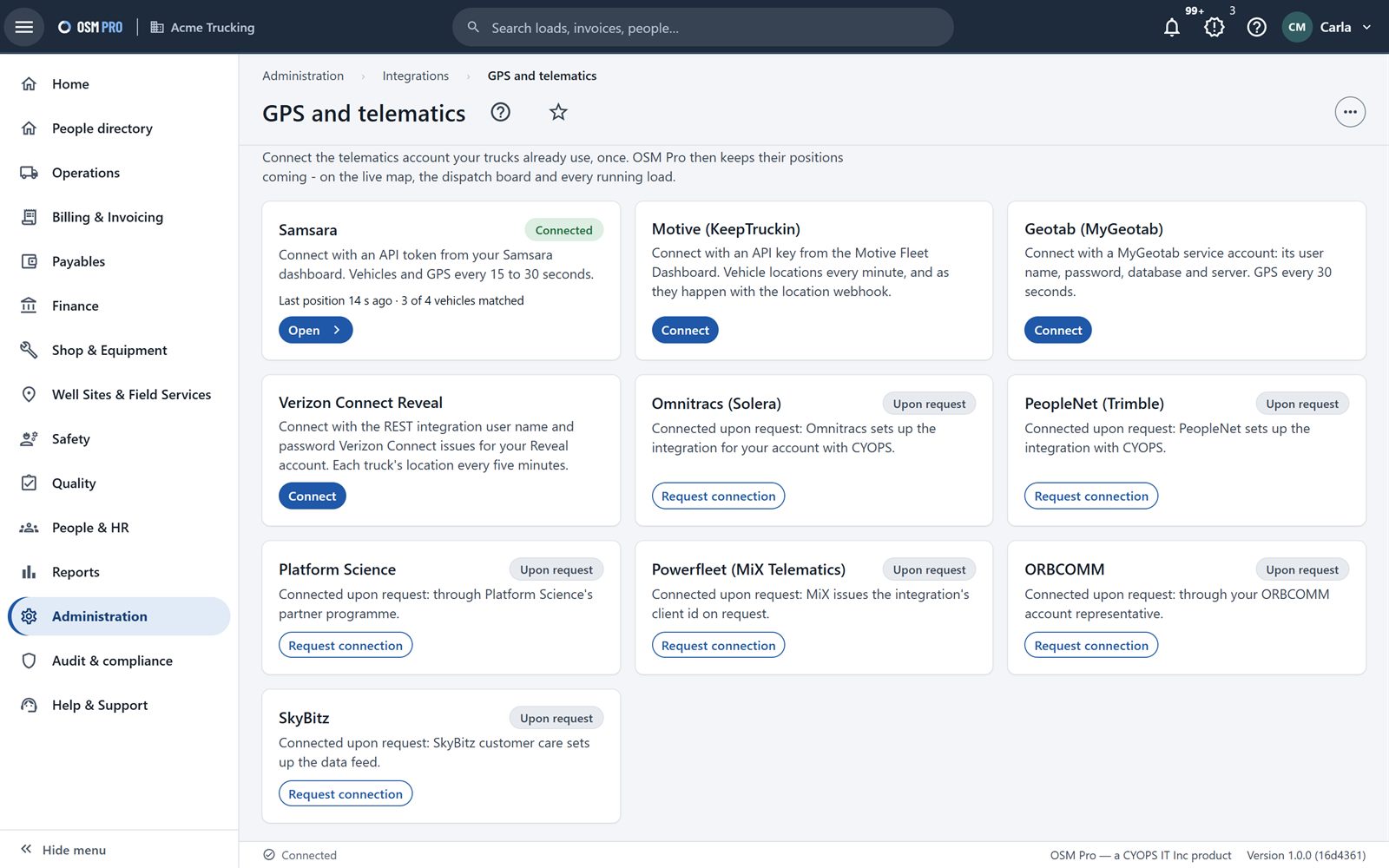
GPS and telematics Connect the GPS account your trucks already use, once. Their positions then keep coming by themselves.
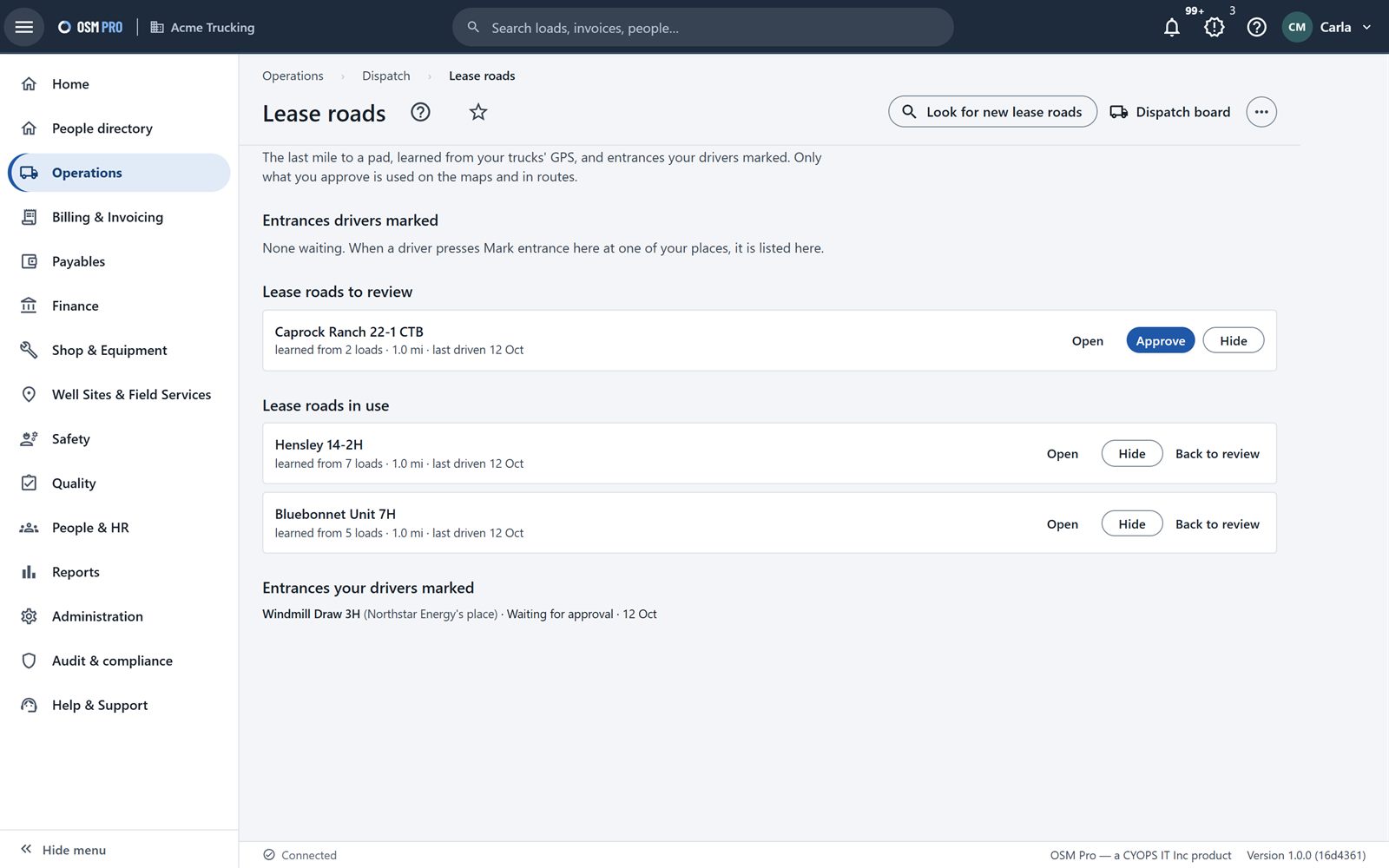
Lease roads The last mile to each pad, learned from your trucks' GPS, and site entrances your drivers marked. Only what you approve is used.
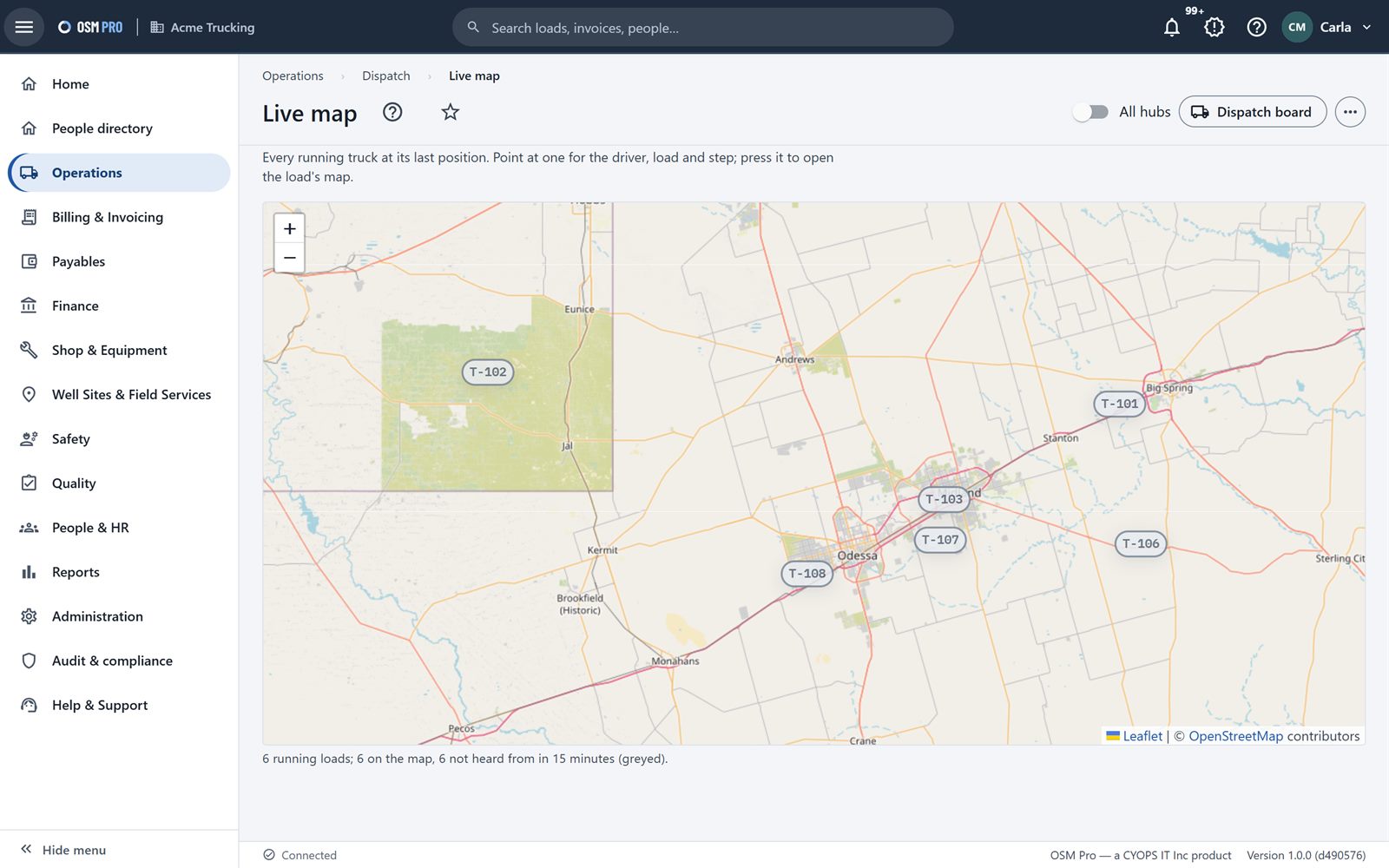
Live map Every running truck at its last position. Point at one for the driver, load and step.
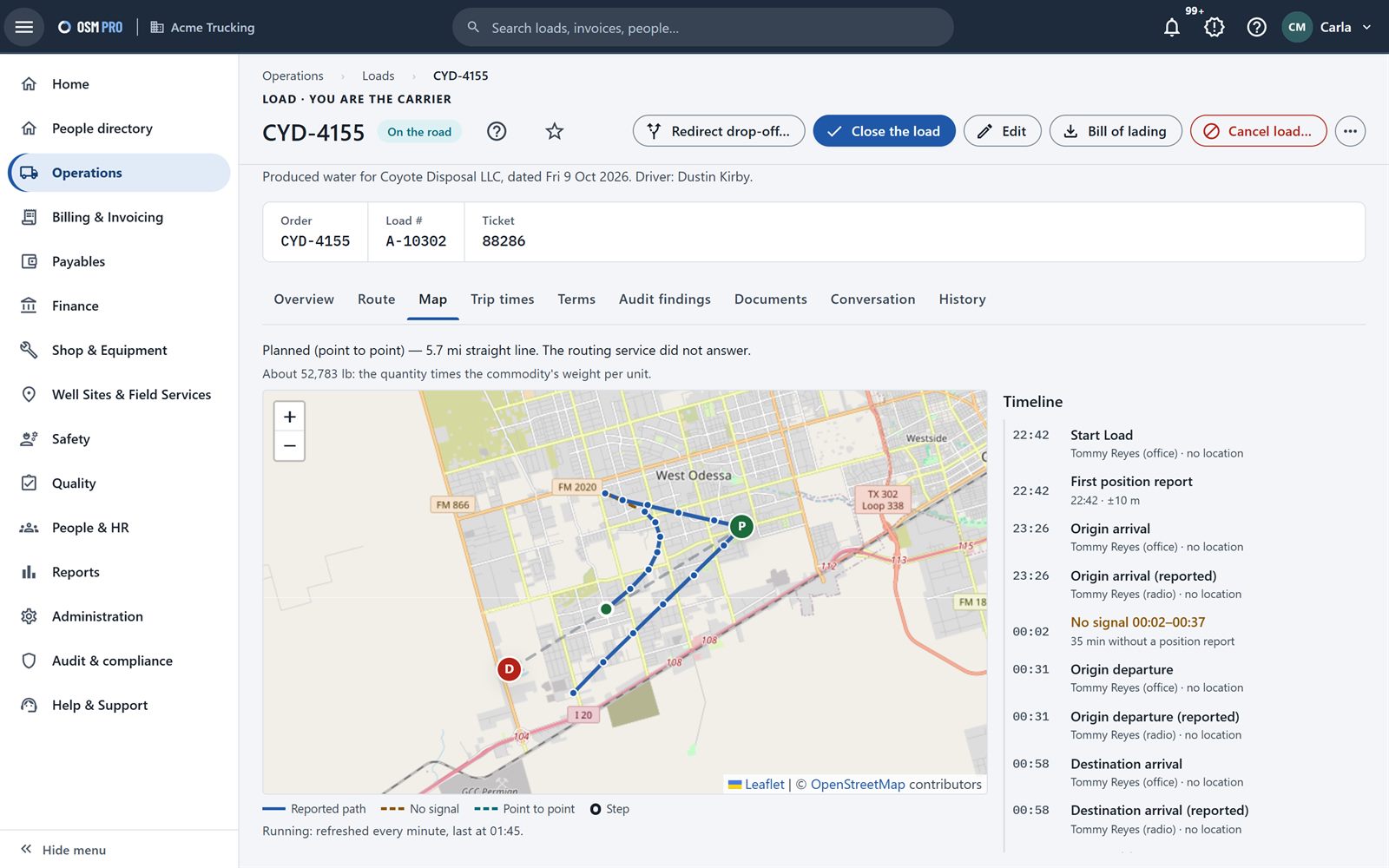
A map on every load The GPS trail and each step of the trip, beside the load's timeline.
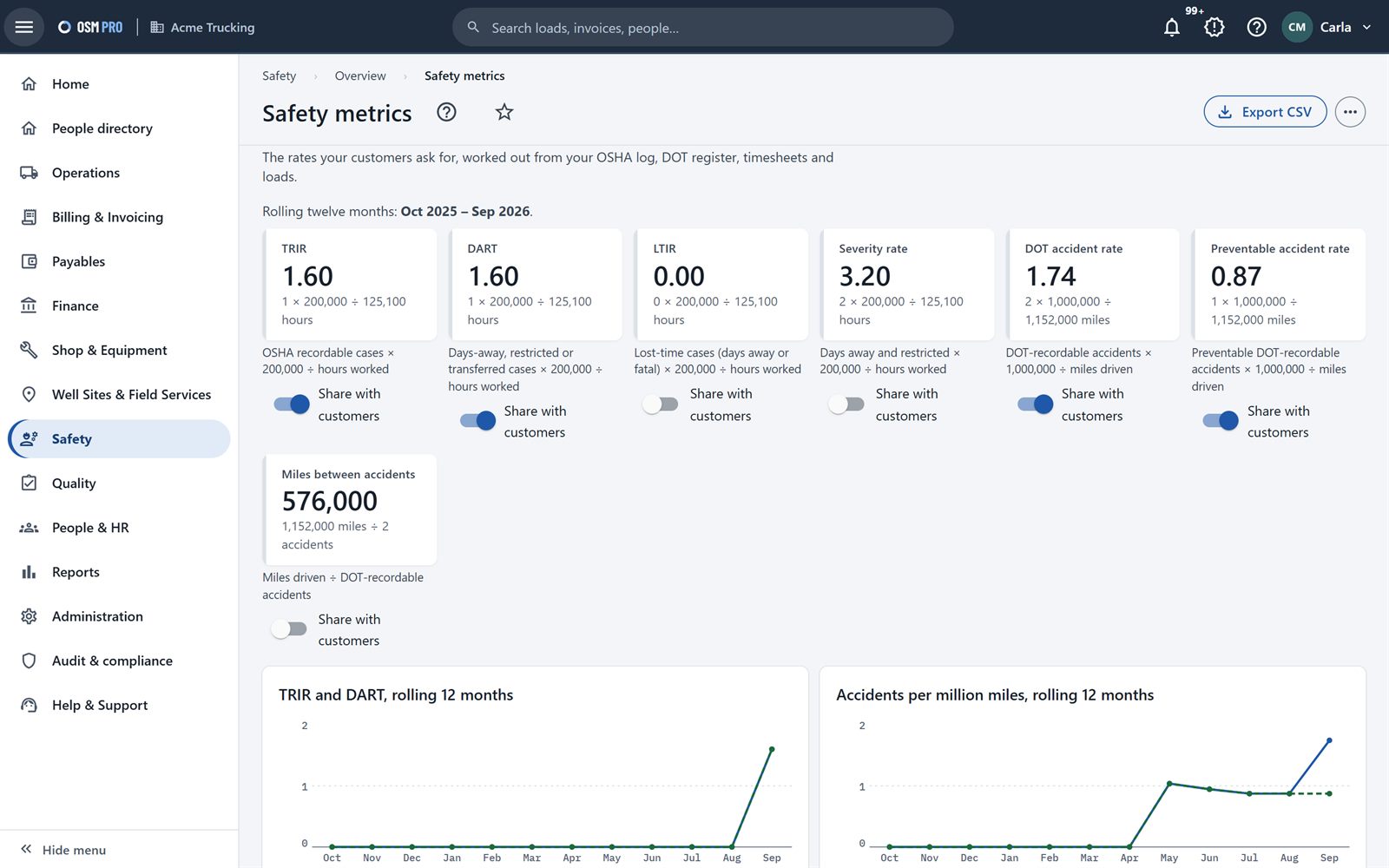
Safety metrics Injury and accident rates over twelve months, worked out from your own records, and shared with customers when you choose.
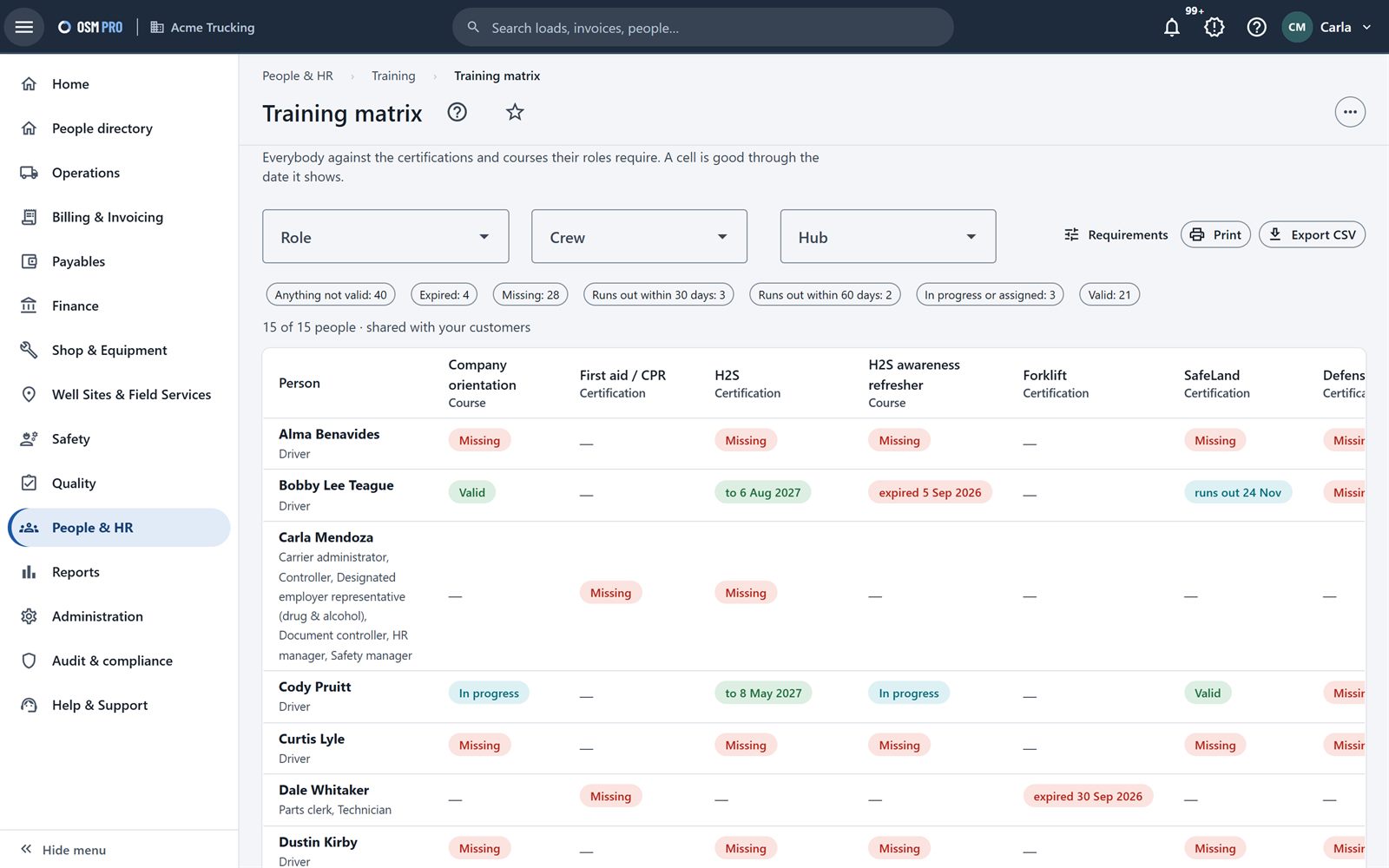
Training matrix Everybody against the certifications and courses their role requires, and when each runs out.
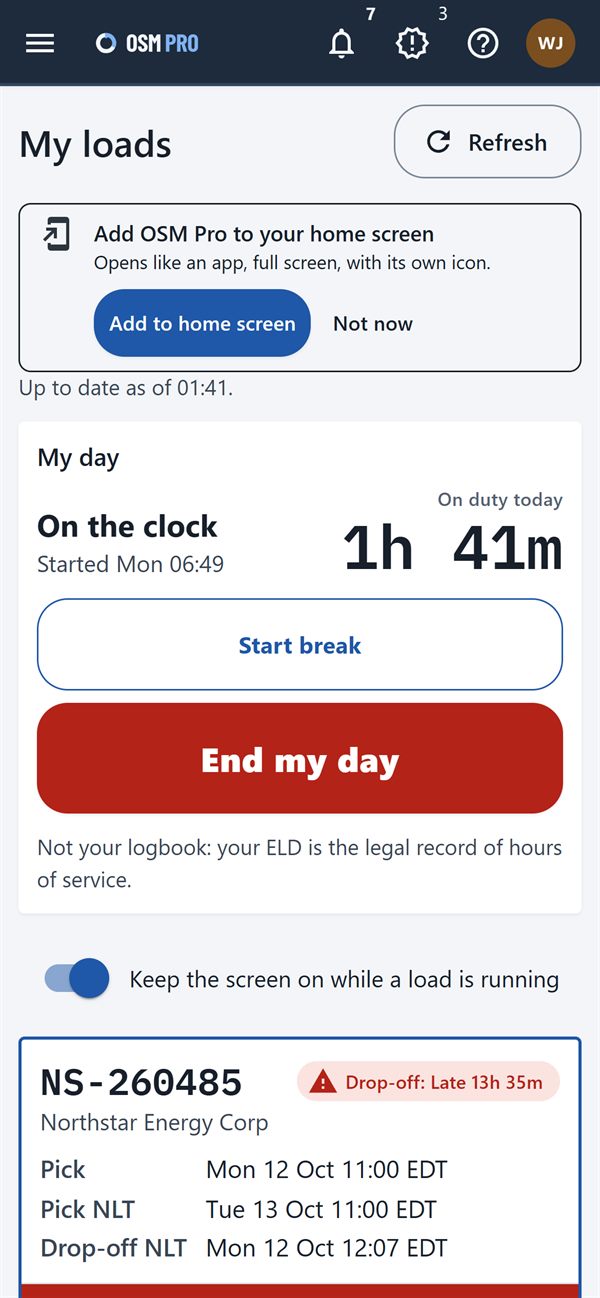
Add to home screen On any phone, OSM Pro offers to sit on the home screen and open like an app.
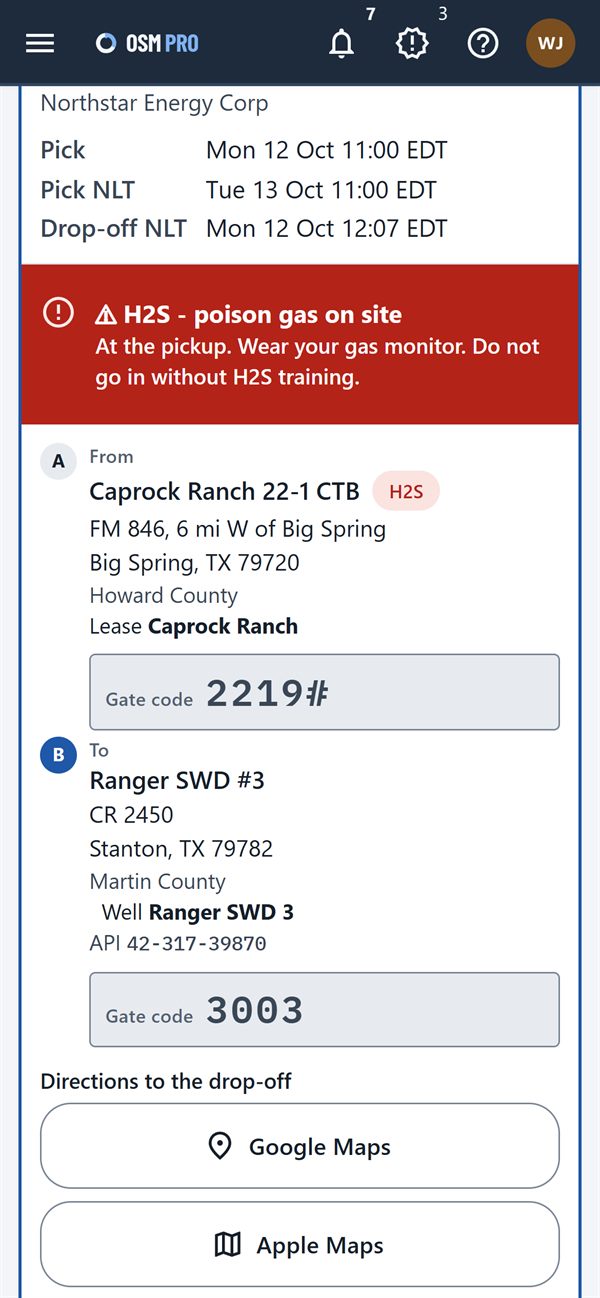
Gate codes and directions The site's gate code for the load's own driver, and turn-by-turn directions to the site entrance.
No feature matches that. Try another word, or ask us .
Accounts, sign-in and security 8
Sign in with two-step verification codes and recovery codes.
New Let people sign in only from your office networks; administrators and the people you choose can sign in from anywhere.Reset a forgotten password, or set a first one, from an emailed link.
Re-enter your password before sensitive changes such as bank details or admin rights.
Get an alert about an unexpected sign-in.
Keep a profile with photo, signature, skills and time zone, and choose who sees each part.
Download your own account data from your profile.
Sign in with a username and your company's short code.
Show all 8 of Accounts, sign-in and security
Company administration and partners 8
Invite partner companies, who must accept, or give a partner read-only access.
Build roles from job templates, down to which fields each role can see.
Set sign-in rules, audit rules, retention, and the numbering of loads and invoices.
Keep your reference data: teams, service groups, place alerts and directions, weight limits, payment terms and tax codes.
Keep a carrier profile with insurance and certifications to share with customers.
Keep contacts who are not users, and choose which load and invoice emails they get.
Set the home page each role opens on.
Vendors in Operations: what each is used for and who to call; purchase orders pick from your list.
Show all 8 of Company administration and partners
Orders and loads 9
Enter loads, or order several at once with their times spaced out.
Repeat a previous order, or start from a saved template for each customer.
Track pickup and drop-off times against their deadlines, with "due soon" and "late" flags.
Combine, split, link, reinstate or roll back loads, or change many at once after a preview.
Change a pickup or drop-off after entry, with the original kept and an address-changes report.
Talk about a load on the load itself, and see every change in its history.
See a load on a map: the GPS trail and each step of the trip.
Load lists open in the column order you already know.
Give each customer its own order settings, such as closing rules, deadline warnings and required checks, and the load shows which rules apply.
Show all 9 of Orders and loads
Dispatch 16
Dispatch from one board: loads that need a truck, the fleet, and each truck's run.
Use hubs, crews, moves between hubs and a free-trucks list; the board updates live.
A driver without a valid qualification, or a truck that is out of service, cannot be dispatched.
Give a load to a truck and its crew, with the lead driver and shift known.
Put a truck's run in order, and mark which trucks are working today.
Watch running trucks on a live map.
Message a driver directly, and see a quick job card by hovering over a load.
Mark a site full or closed and send the load to another drop-off.
On a phone, the board becomes Loads, Trucks and Run order tabs.
Truck positions come straight from the GPS your trucks already use, onto the live map, the board and every running load.
Maps keep themselves up to date while they are open, and a truck that goes quiet is asked for its position.
Lease roads: the last stretch to each pad is learned from your trucks' GPS, and only the roads you approve are used.
The board warns when a driver on a load is not signed in, for the hubs you are looking at; trucks with their own GPS need no sign-in.
Hover a driver's name to see their sign-in and read them today's code.
Every step on the map shows where the truck was, even when the office enters it.
A stop just before the site is offered as its entrance, for you to approve.
Show all 16 of Dispatch
On the driver's phone 14
Works without signal: everything is kept on the phone and sent once there is signal.
Start and end the day on the time clock; crew members see the lead driver's load.
Do vehicle inspections (DVIR) on the phone.
See loads in run order and tap through each step, with location and a two-minute undo.
End the trip and close the load from the cab, add photos, and share position while a load runs.
Message dispatch, report a full site, an incident or a concern, and fill in a job safety analysis (JSA) before work.
Read company documents offline, and take training courses.
Turn-by-turn directions on the phone, straight to the site entrance.
The site's gate code, shown only to the load's own driver while the load is running.
Mark a site's entrance from the phone, for the site's owner to approve.
Add OSM Pro to the home screen of any phone or tablet, so it opens like an app.
Drivers sign in with their employee number and a code dispatch reads them each day, and see only their own loads.
Open the site entrance in Google Maps, Apple Maps or Waze.
The phone shares its position only while a load is running, more often near the site.
Show all 14 of On the driver's phone
Audits and closing 6
Every load is checked against rules, and the company that owns the load decides whether a problem holds it.
Both sides can see the rules, including an optional rule for pickups or deliveries after the deadline.
Put a checked value back to what was ordered or reported.
Require a person to verify closed loads before billing.
Filter closed loads by problem: no ticket, missing times, barrels that do not add up, open findings.
Every load closes with a Trip End, and trip time runs from Start Load to Trip End.
Show all 6 of Audits and closing
Billing and invoicing 5
Build your own charge schedules and invoice rules, with versions, and preview them on real loads.
See what is ready to invoice, with held loads explained, then create draft invoices.
Approve, send and void invoices; set fuel surcharges and how loads split across invoices.
Answer a customer's dispute line by line.
A load counts as delivered for invoicing at Trip End.
Show all 5 of Billing and invoicing
Payables 4
See each invoice you receive with every line, your coding and the loads behind it.
Approve for payment, dispute the whole invoice or single lines, and record payment.
Turn an invoice into a bill and pay it through Finance, without paying twice.
Print an invoice or download its invoice packet.
See this area of Payables
For energy companies 9
Order loads from trucking companies; each one is checked for insurance, exclusions, tier, weight and certifications.
Choose whether trucking companies must accept each order, for all of them or one at a time.
Take back an order, or give it to another trucking company, before a truck is sent.
Set your own billing rules, which come first on your loads.
Keep a library of partner requirements, review evidence, grant waivers, and choose allow, warn or block at tender.
Report an incident against a trucking company, and see the incidents and safety figures they share with you.
Raise a complaint about a partner from the load page.
Your own order rules come first on your loads.
Mark your sites' entrances on a map, and approve the entrances drivers suggest.
Show all 9 of For energy companies
Documents and printing 7
Print bills of lading with a QR code, BOL lists, job cards, master tenders and transport tickets.
Print invoices, and reprint by number or date range.
Download an invoice packet: one PDF with the invoice, BOLs and scanned tickets.
The PDF of each sent invoice is kept as the copy of record.
Match a folder of scanned tickets to their loads by file name.
Scans and photos are stored smaller, so pages and invoice packets open faster.
Search finds documents across your loads, and shows when more than 10,000 match.
Show all 7 of Documents and printing
Reports and exports 5
Build reports on your own data: choose columns, filter, group, total, chart, save and share.
Export to CSV or Excel, and start from ready-made reports.
Costing, barrel breakdown, billing, crew and hub reports.
Print any report, save it as a PDF or email it, now or on a schedule.
Report pages you filter and click into, down to the loads behind a number, with ready-made pages for each role.
Show all 5 of Reports and exports
Connecting your systems 7
Connect your own systems with API keys that have scopes, can be rotated and log every request; add webhooks.
Browse the API reference and try calls as yourself.
Connect QuickBooks Online or QuickBooks Desktop Enterprise, with mappings and a reconciliation.
Turn orders sent by email into draft loads for a person to review.
Bring setup data in from spreadsheet templates.
Export payroll to ADP, Gusto or QuickBooks Payroll.
Connect Samsara, Motive, Geotab or Verizon Connect once; Omnitracs, ORBCOMM, PeopleNet, Platform Science, Powerfleet and SkyBitz are connected on request.
Show all 7 of Connecting your systems
Financials 37
Set up the books in one step, with costs tracked by lease, well, AFE (cost code) and truck.
The books update as the work happens, and a second person approves any entry made by hand.
Money owed to you, bills to pay, payment runs, bank reconciliation, equipment and budgets.
Financial statements, job costing, and profit by load and by truck.
Bank statement files and bank rules, deposits, transfers and credit cards.
Print checks, make ACH and positive pay files, estimates, recurring entries, statements, late fees and reminders.
Sales tax by jurisdiction, 1099s, closing the year, loans and depreciation, and a package for your accountant.
Choose where your books are kept: send invoices to QuickBooks, or keep them in Finance.
Move from QuickBooks: history and open invoices and bills, checked to the cent before you switch.
Approve big purchases by amount and track spending against your capital budget.
Projects collect their costs while they are built, then become assets the day they are ready.
Sell, scrap, write down or move an asset, with every change on the books.
Leased trucks, trailers and yards on your balance sheet, posted each month.
Section 179 and bonus depreciation, with the mid-quarter rule worked out for you.
Year-end asset reports: roll-forward, depreciation forecast, book against tax and lease maturity.
Add customers in Finance with their terms, tax, credit limit and statement email, each on its own form.
Vendors have their own page and form in Finance.
Keep your books in Finance and still send your invoices and payments to QuickBooks.
Run several companies as one group, with consolidated statements and intercompany eliminations.
Intercompany loans, fees and interest post to both companies at once, with a report of what does not match.
A group's month is signed off with a written reason while intercompany differences are still open.
Approval limits by amount and role for bills, journals and payment runs, approved in order and never by the person who entered them.
A second person releases every payment run before checks or ACH files are made.
Vendor bank and remit-to changes wait for a second person's call-back, and payments to that vendor wait too.
A month-end close checklist with preparer and reviewer sign-off, and reconciliations signed by two people.
Posting locks per person or role, and a change log of who changed what in the books' setup.
Limits on how many people may hold each finance power, with a second administrator approving every grant.
Finance > Reports: every detailed financial report, printable, emailable, exportable to Excel and schedulable, for finance people only.
Audit reports for approvals, the close and journal review, and who can do what, ready for your auditor.
New W-9s on every vendor: the taxpayer id encrypted, the scan attached, and missing W-9s flagged.New IRS TIN matching: make the bulk file, upload it, and read the results back onto each vendor.New Backup withholding at 24% with B-notices, deadlines, letters and Form 945 totals.New 1099-NEC and 1099-MISC files for the IRS IRIS portal, with receipts, corrections and recipient copies.New Balanced or credit-only ACH files per bank account, checked against their own totals before download.New Prenotes for new vendor bank accounts, and ACH returns and notices of change recorded.New Stale checks: reissue, void back to the vendor, or move to unclaimed property, each with a reason.New Unclaimed property by state: waiting periods, due-diligence letters, holder reports and remittances.
Show all 37 of Financials
Maintenance shop and inventory 4
Track units with meters and due dates, and preventive maintenance by miles, hours or days.
Out-of-service defects from driver inspections block dispatch of that unit.
Work orders with labour, parts and outside repairs, on a shop calendar.
Parts inventory: purchase orders, receiving, stock counts and reorder; costs go to the ledger.
See this area of Maintenance shop and inventory
Safety 6
Report incidents from the web or a phone, investigate them and assign corrective actions.
Regulatory deadlines, the DOT accident register and OSHA 300 and 300A logs.
Customers are told automatically about incidents on their loads.
Injury and accident rates (TRIR, DART, LTIR and preventable accidents) with trends, export and sharing.
Tailgate safety meetings with signed attendance, job safety analyses (JSAs), stop-work reports and observations.
DOT compliance for driver files, vehicles and company filings, with warnings at dispatch.
Show all 6 of Safety
People and HR 6
Employee records, driver qualification files with expiry alerts, and drug and alcohol testing.
Timesheets, time off, payroll runs with pay stubs, and self-service for each employee.
Reviews, discipline, and checklists for people starting and leaving.
Time clocks: the phone, a yard kiosk with PIN, badge or QR code, time clock terminals and punch files.
Punch rules for rounding, breaks and overtime, a queue for exceptions, and signed-off corrections.
Every driver gets an employee record and a sign-in when they are added.
Show all 6 of People and HR
Wellsite services 5
Keep well sites, wells, site equipment and site maintenance schedules.
Pumpers' inspection checklists work offline and can open work orders.
Request deliveries or services from service companies, priced from their price books.
Technicians deliver and collect a signature on the phone, even without signal.
Field tickets are approved or disputed line by line, then invoiced and paid.
Show all 5 of Wellsite services
Quality 5
Problems found (nonconformances), how their cause was found and fixed, and complaints.
Controlled documents with revisions, read and acknowledged.
Internal audits, management reviews, goals, suppliers, risks and measuring equipment.
Inspection checklists you can run at a desk or on a phone.
Each employee reads the released procedures for their role.
Show all 5 of Quality
Your own audits and compliance 4
Invite your auditors with read-only access that expires.
Export tamper-evident records for your auditors, and keep duties separated.
Access reviews, certifications and audit engagements.
A security posture page, and an ISO 9001 clause map.
See this area of Your own audits and compliance
Help, training and notifications 5
Help on every page, a help centre and a What's new list inside the app.
Ask for help and follow the conversation, with a screenshot attached.
My training lists the courses for your role, with quizzes and certificates.
A training matrix shows what each role needs and who meets it.
A notification bell, pop-ups, quiet hours, and emails you choose, with one-click unsubscribe.
Show all 5 of Help, training and notifications
Look and use 7
Five colour themes, each in light and dark, and your choice follows you to every device.
Pages use the full width; star your favourite pages and pick your home page.
Saved screen layouts, a menu you can hide, and lists with your choice of columns, filters and grouping.
Works on phone and tablet with large tap targets, and installs from the browser.
Readable contrast in every theme, and labels for screen readers.
Choose your menus: tabs, or every group of a menu on one page.
When a new version is ready, a Refresh bar says so. Nothing reloads by itself.
Show all 7 of Look and use
See it for yourself, right now
Try the demo
Tell us a little about you (optional) and look around right away.